TOMCAT
To connect Tomcat with Java, you typically need to follow these steps:
Download and install Java Development Kit (JDK) if you haven't already. Make sure you have Java installed on your system and the
JAVA_HOMEenvironment variable is properly set.Download Apache Tomcat from the official website (https://tomcat.apache.org) and extract the downloaded archive to a directory on your computer.
Set up your Java web application project. This involves writing your Java code, creating servlets, JSP files, etc., and organizing them into a directory structure.
Build your Java web application into a WAR (Web Application Archive) file. A WAR file is a compressed package that contains all the necessary files for your web application.
Copy the WAR file into the Tomcat's "webapps" directory. This directory is typically located in the Tomcat installation folder.
Start Tomcat by running the startup script. On Windows, it is usually
startup.bat, and on Unix-based systems, it isstartup.sh. These scripts are located in the "bin" directory of your Tomcat installation.Tomcat will deploy your web application by automatically extracting the contents of the WAR file. It will create a directory with the same name as your WAR file in the "webapps" directory.
Access your web application by opening a web browser and navigating to
http://localhost:8080/your-web-app-name. Replaceyour-web-app-namewith the actual name of your web application.
That's it! Your Java web application is now connected to Tomcat and can be accessed through a web browser. You can make changes to your application, rebuild the WAR file, and copy it to the "webapps" directory to deploy the updated version.
So currently consider it to be a beefed up version of a Web server or a Servlet Container.
The following table shows the support Tomcat provides out of the Box.
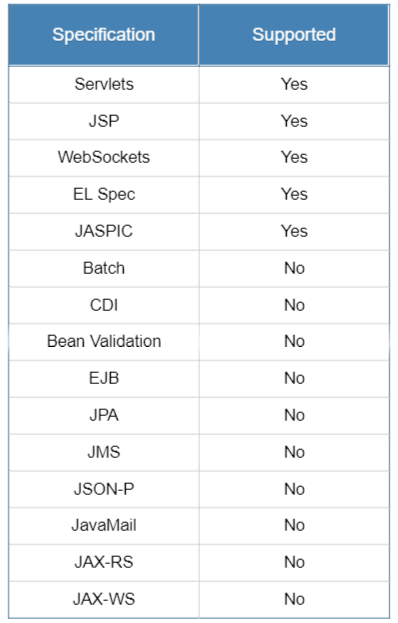
As mentioned in Oracle’s Docs
A Java EE application server, also known as a Java EE container, is any server that is fully compliant with the J2EE or Java EE platforms. Unlike a regular web server, an application server can run full enterprise applications, EJB modules, and web services. It can also manage transactions of persistent entity objects and communicate with databases.
But to know how we our Java applications actually run on Tomcat, it is important that we have an understanding about it’s architecture.
Tomcat and it’s Architecture
Tomcat is developed and maintained by an open community of developers under the belt of the Apache Software Foundation, released under the Apache License 2.0 license.
Whenever we say that we have started our Tomcat it means we have actually started the Catalina instance.
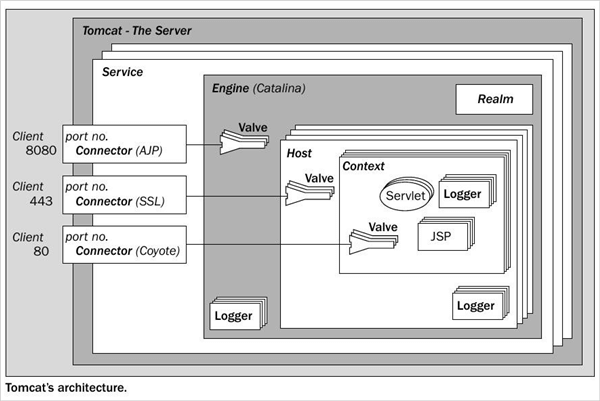
Catalina as a Servlet Container:-
- Whenever we try to deploy our java application to Tomcat, it searches for the Deployment Descriptor(Web.xml) file which contains information about URL and servlet mappings.
- Based on the configuration in deployment descriptor file, Tomcat can load/ initialize the servlet classes on startup or as a response to a request.
- When Tomcat receives a request, it decides on which servlet should handle the request.
- Once the request has been mapped to the appropriate servlet, Tomcat checks to see if that servlet class has been loaded. If it has not, Tomcat compiles the servlet into Java bytecode, which is executable by the JVM, and creates an instance of the servlet.
- Tomcat invokes the service method of the servlet, to handle client’s request.
Apart from web.xml we must remember that there is one more configuration file i.e. server.xml, which has the details regarding what components need to be included in the server, their configuration like what ports to open, how to interconnect them and how to boot up the tomcat instance.
Coyote as a Connector
But aren’t we forgetting something in the first place? Catalina by itself is just a servlet container How does Tomcat even receive the client request? This is facilitated by Tomcat’s connector component — Coyote.
Why Tomcat?
There are few options an enterprise can choose for their java server solution.
web servers: Jetty, Tomcat
application servers: Glassfish, WebSphere, WildFly.
Even though Tomcat doesn’t provide all the features of an application server like IBM’s WebSphere, it has become the most popular choice for Java application deployments. Mostly due to:
- It is Lightweight, with short load and redeploy times
- Open source software which has been around for a long time
- Tomcat is free, compared to high cost associated with some of the other popular application server solutions
- Even for the features that Tomcat doesn’t come with we can include them as external dependencies.
- Tomcat is very flexible and extendable — scaling to Enterprise support via TomEE, JBoss, WildFly is possible.
- It can be easily integrated with different Java frameworks like Spring.

Comments
Post a Comment